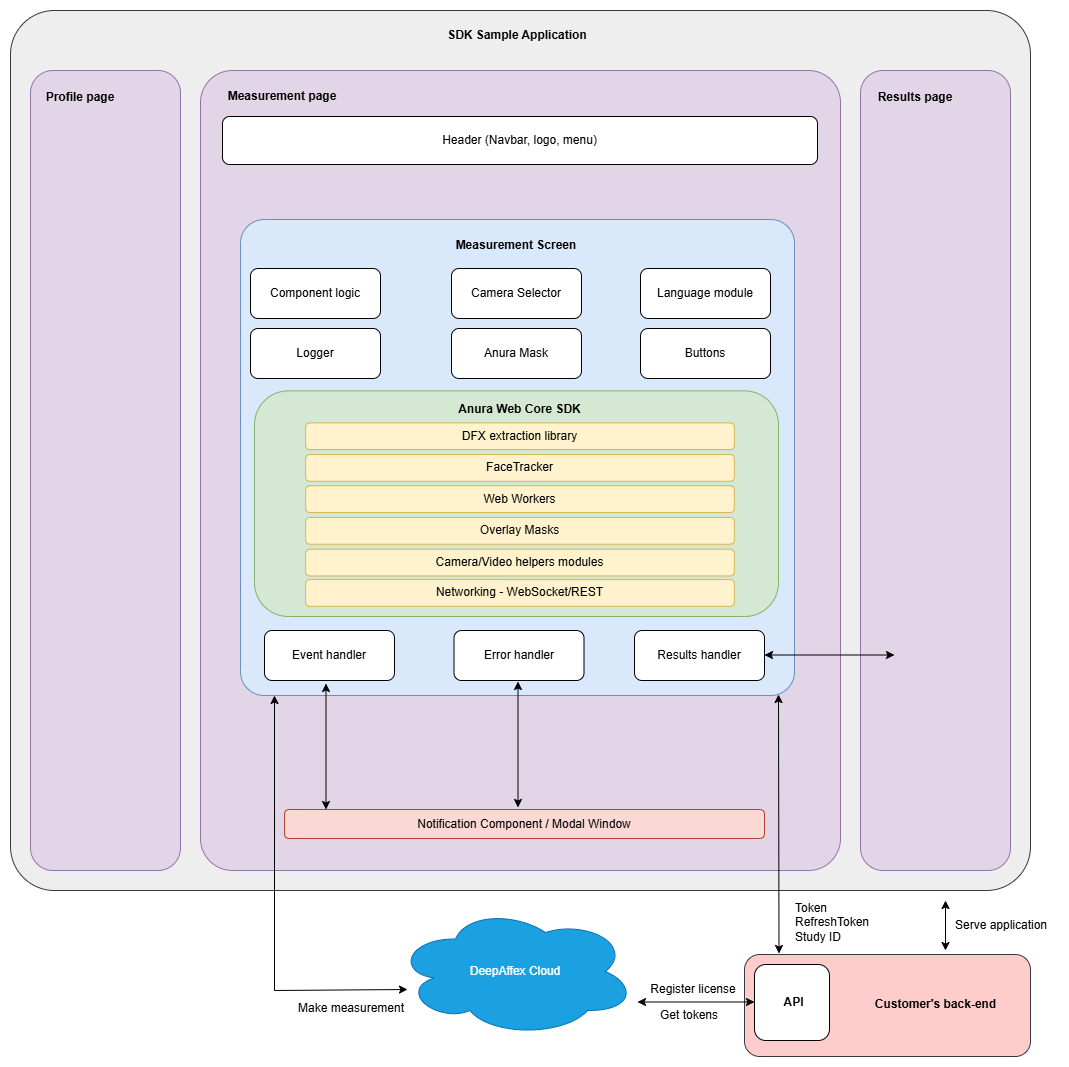
Is WMEA Right for You?
Choosing the right integration approach depends on your customization needs and development resources. WMEA uses the NuraLogix Anura Web Core SDK under the hood but provides a pre-built, customizable interface that significantly reduces development time. This chapter helps you determine whether WMEA's capabilities align with your project requirements.
Understanding Your Options
You have two main paths for integrating NuraLogix measurement technology on the web:
- WMEA (Web Measurement Embedded App) - Pre-built interface using the Anura Web Core SDK internally
- Direct Web SDK Integration - Build your own interface using the core Anura Web Core SDK
The key decision factors are how much customization you need and how much development time you can invest.
Anura Web Core SDK Implementation Details
WMEA is built on top of NuraLogix's Anura Web Core SDK, which provides:
Core Features:
- MediaStream Processing: Process standard MediaStream from attached cameras, video files, or any other source
- Built-in Masks: Anura and Tele masks included, with ability to create custom masks
- Flexible Measurement Duration: Support for measurements up to 2 minutes
- Optional Components: Camera and video controller components available, or create the MediaStream yourself
- Full Constraint Control: Complete control over all constraints supported by the DFX extraction library
- Advanced Debugging: Built-in comprehensive logging system for development and troubleshooting
Anura Web Core SDK Use Cases:
- Creating fully customizable web measurement experiences
- Building 30-second Anura-style measurements or longer telehealth measurements
- Integration within JavaScript-enabled ecosystems: Electron, desktop apps, native apps, React Native, progressive web apps, WordPress plugins, WeChat Mini Programs, video conferencing plugins, embedded infotainment systems
- Custom measurement workflows beyond standard implementations
Available Resources: Sample applications are available for the Anura Web Core SDK including React and vanilla JavaScript implementations for reference. See: Anura Web Core SDK documentaion
Architecture Overview
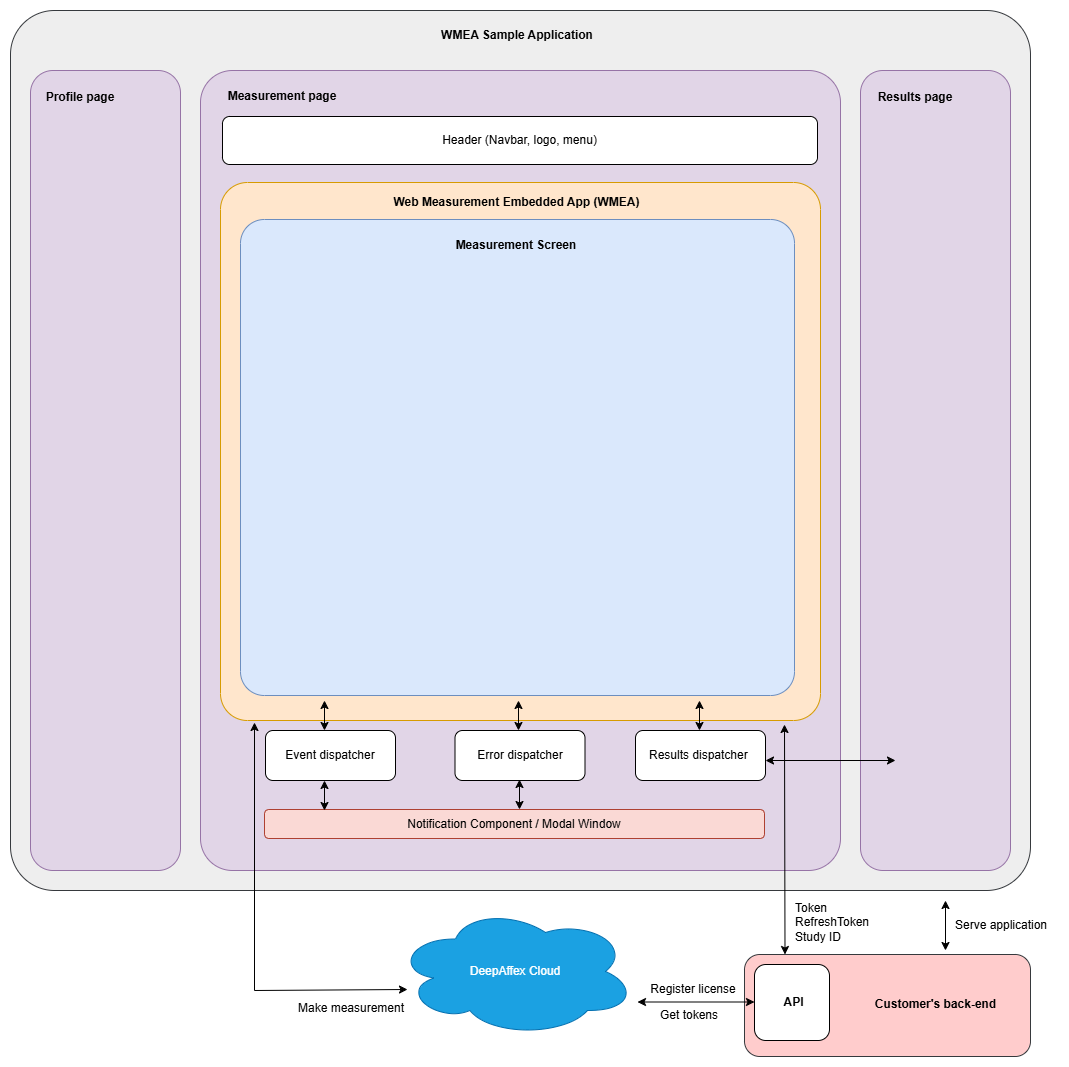
WMEA is designed as an embeddable component that integrates seamlessly into your existing application architecture while maintaining its core measurement functionality:
Division of Control
Your Application Controls:
- Navigation, layout, and overall page structure
- User authentication and profile collection workflows
- Results presentation and data storage
- Complete branding and styling outside the measurement container
WMEA Controls:
- Camera interface, permissions, and video preview
- Face detection overlay and positioning guides
- Measurement controls, timers, and progress indicators
- Core UI component styling within the measurement interface
- Error handling and processing feedback during measurement
- Network connection to DeepAffex cloud
Container-Based Integration
WMEA uses a container-based architecture where you provide a DOM element and WMEA renders its interface within that container:
// Your application provides the container
const container = document.getElementById('measurement-container');
// WMEA renders its interface inside your container
measurementApp.init({
container: container,
// ... other configuration
});
Navigation Bar Integration
WMEA is completely unaware of your application's navigation structure. This means:
- Your navbar remains intact - Users see your branding and navigation throughout
- No redirects or pop-ups - The measurement happens within your application context
- Seamless experience - Users never leave your application or lose their session
- Full control - You decide how to navigate to/from the measurement page
Customization Capabilities
What You Can Customize
Styling and Theming:
- CSS theming with your brand colors, fonts, and visual identity for your application
- Custom UI components for profile collection and results display outside the measurement container
- Dark/light mode coordination between your app and WMEA
- Some styling control on the measurement page (error modals, navigation)
Configuration and Behavior:
- Constraint validation (distance, direction, movement)
- Language selection from WMEA's supported languages
- Data storage and user authentication systems
What You Cannot Customize
- Face detection overlay, outline, and positioning guides
- Measurement controls (start/stop, timers, progress indicators)
- Visual feedback for face positioning and distance before start of measurement
- Core UI component styling (camera selector, buttons, progress bars, loading states)
- Language support outside WMEA's supported languages (unless a request is approved)
When to Choose WMEA vs. Web SDK
Choose WMEA When:
- You want fast integration with minimal development effort
- The standard measurement interface meets your needs
Choose Anura Web Core SDK When:
- You need complete control over every aspect of the measurement UI
- You want to deeply integrate measurement controls into your existing interface
- You have specific UI requirements that conflict with WMEA's design
- You need custom measurement workflows beyond WMEA's capabilities